A wearable device prototype came back from the assembly floor with a problem that no amount of firmware tweaking could fix. The USB-C port sat 0.4 mm below the enclosure opening, leaving a visible gap and a sharp edge that snagged on charging cables. The connector itself was fine. The PCB thickness was within spec.
The issue was that the design team had selected a top-mount USB-C connector for a product that required the port to sit flush with the board edge — a job that only a mid-mount connector can do. The board respin cost two weeks and several thousand dollars in expedited fabrication. The lesson was simple: the difference between a top-mount, mid-mount, and recessed USB-C connector is measured in millimeters, but getting it wrong is measured in schedule delays and scrapped prototypes.
A USB-C mid mount connector solves a specific mechanical problem: how to place a USB-C port at the centerline of a PCB so the mating face sits flush with a thin enclosure opening. This connector type is the default choice for ultrabooks, tablets, smartphones, and wearables where board thickness dictates port placement. This guide covers the engineering essentials — mechanical dimensions, PCB footprint design, mid-mount vs top-mount comparison, and selection criteria — to help you specify the right connector before the first board is laid out.
What Is a USB-C Mid-Mount Connector?
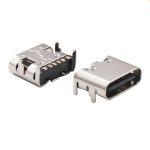
A mid-mount USB-C connector is a surface-mount receptacle designed to sit within a cutout or notch in the PCB, rather than on top of the board surface. The connector body is partially recessed into the board profile, which positions the mating face at or near the PCB centerline. This allows the USB-C port to align with the enclosure opening even when the PCB is very thin — typically 0.8 mm to 1.6 mm.
The defining feature of a mid-mount connector is its contact height or mating face offset from the PCB surface. While a standard top-mount connector sits entirely above the board, a mid-mount variant is engineered so that the contact tongue and shielding shell are positioned at a specific Z-height relative to the board edge. Some mid-mount connectors place the mating face exactly at the PCB centerline; others offset it slightly depending on the enclosure design. The key is that the connector doesn’t add its full height above the board — it shares vertical space with the PCB itself.
This configuration is also referred to as a USB-C recessed connector or USB-C sinking connector in some design communities, because the connector appears to be “sunken” into the board rather than perched on top of it. The terms are interchangeable in practice, though “mid-mount” is the more common designation in component catalogs.
Mid-Mount vs Top-Mount USB-C: When the Difference Matters
Choosing between a mid-mount and top-mount USB-C connector is not a matter of preference — it’s dictated by the mechanical stack-up of the PCB, enclosure, and the required port position.
| Feature | Top-Mount USB-C | Mid-Mount USB-C |
|---|---|---|
| Connector position relative to PCB | Sits entirely above the board surface | Partially or fully recessed into a PCB cutout |
| Typical PCB thickness compatibility | 1.0 mm – 1.6 mm (less critical) | 0.8 mm – 1.2 mm (tight tolerance) |
| Port alignment with enclosure | Port sits above board centerline; requires vertical offset in enclosure | Port aligns at or near board centerline; flush with thin enclosures |
| Assembly complexity | Standard pick-and-place; no special PCB routing | Requires PCB cutout and edge connector support |
| Best for | Desktop monitors, docking stations, thick enclosures | Smartphones, tablets, ultrabooks, wearables |
| Mechanical vulnerability | Solder joints bear lateral cable force directly | Solder joints can be shielded by board edge; lower lever arm |
Mid-mount vs through-hole: Through-hole USB-C connectors provide superior mechanical anchoring but add height above the board and require wave or selective soldering. For ultra-thin designs, through-hole is rarely an option. Mid-mount SMT connectors are the only practical solution when the total Z-height budget is under 3 mm.
Mid-mount vs bottom-mount: Some designs flip the connector to the bottom side of the PCB to align the port with a lower enclosure opening. This is mechanically similar to mid-mount but uses a standard top-mount connector placed on the opposite board side. The distinction matters because a true mid-mount connector provides symmetric or centered port positioning that a bottom-mount cannot achieve without a board cutout.
USB-C Mid-Mount Connector Footprint and Dimensions
Designing the PCB footprint for a mid-mount USB-C connector requires more mechanical coordination than a standard top-mount part. The following parameters must be verified from the manufacturer’s drawing:
PCB cutout dimensions: The cutout in the board edge must match the connector body width and depth with tight tolerances (typically ±0.05 mm). Too large, and the connector lacks lateral support. Too small, and it won’t seat during assembly.
Pad layout: Mid-mount connectors typically have two rows of SMT pads — one row on the top layer and one on the bottom layer — flanking the cutout. The pads must be positioned precisely relative to the cutout edge to ensure that the connector sits flush.
Mating face Z-height: This is the critical dimension that determines enclosure alignment. The manufacturer’s drawing will specify the distance from the PCB surface (or centerline) to the center of the USB-C tongue. For a connector designed to center the port on a 1.0 mm PCB, the mating face Z-height will be approximately 0.5 mm from each board surface.
Overall connector dimensions: A typical 24-pin mid-mount USB-C receptacle measures approximately 8.3 mm wide, 5.5 mm deep (into the board), and 2.4 mm tall. The exact dimensions vary by manufacturer and pin count (6-pin, 16-pin, 24-pin).
Always obtain the 2D mechanical drawing and a 3D STEP model from the connector supplier before finalizing the PCB layout. A footprint that works for one mid-mount connector may be incompatible with another, even if both are marketed as “USB-C mid-mount.”
Looking for USB-C Mid-Mount Connectors for Your Thin Design?
Vistar Electronics manufactures mid-mount, top-mount, and recessed USB-C connectors — 6-pin, 16-pin, and 24-pin configurations, with 5A current rating and USB 3.1 / USB4 support. 2D drawings and 3D STEP models available. RoHS 3 / REACH compliant. MOQ 1,000 pcs. Free samples for qualified projects.
Looking for USB-C Mid-Mount Connectors for Your Thin Design?
Vistar Electronics manufactures mid-mount, top-mount, and recessed USB-C connectors — 6-pin, 16-pin, and 24-pin configurations, with 5A current rating and USB 3.1 / USB4 support. 2D drawings and 3D STEP models available. RoHS 3 / REACH compliant. MOQ 1,000 pcs. Free samples for qualified projects.
PCB Layout Guidelines for Mid-Mount USB-C Connectors
Laying out a PCB for a mid-mount connector introduces mechanical constraints that top-mount designs don’t face. The board cutout is a structural element, not just a clearance area.
Cutout tolerance: The PCB cutout must match the connector body dimensions within ±0.05 mm. A cutout that is too large leaves a gap that reduces mechanical support. One that is too small prevents the connector from seating, causing it to sit proud of the board surface.
Pad placement relative to cutout edge: The SMT pads must be positioned so that when the connector is placed into the cutout, the contact leads land precisely on the pads. The manufacturer’s recommended footprint will specify the distance from the cutout centerline to the pad rows. Follow this exactly — small deviations cause misalignment that cannot be corrected in reflow.
Strain relief: Because the connector body is partially recessed, the solder joints are somewhat protected from direct lateral forces. However, the pads still carry the full load of cable insertion and extraction. Use enlarged pad areas, anchor tabs if available, and design the enclosure to absorb the insertion force so the solder joints see compression rather than peeling stress.
Routing high-speed pairs: For 24-pin connectors supporting USB 3.1 or USB4, the SuperSpeed differential pairs (TX1, RX1, TX2, RX2) must be routed with controlled impedance. The board cutout can disrupt the reference plane; ensure that the ground plane extends as close to the cutout edge as possible to maintain a consistent return path.
Thermal management: Mid-mount connectors that carry USB PD currents up to 5A require adequate copper on the VBUS and GND pads. Use direct connections to power polygons without thermal relief spokes, and consider 2 oz copper for the outer layers to minimize resistive heating.
For more detail on high-speed routing, see our USB-C PCB layout guide and USB Power Delivery Guide.
How to Choose a USB-C Mid-Mount Connector Supplier
Selecting a supplier for a mid-mount USB-C connector involves more than comparing unit prices. The mechanical tolerances are tight, and a footprint change mid-production can force a board respin.
- Mechanical documentation: The supplier must provide a detailed 2D mechanical drawing with all critical dimensions — cutout dimensions, pad layout, mating face Z-height, and overall connector envelope. A 3D STEP model is essential for enclosure design verification.
- Tolerance control: Ask for process capability data on the cutout-related dimensions. A supplier that cannot hold ±0.05 mm on the connector body width will generate intermittent assembly problems.
- Plating and durability: Gold-plated contacts (0.38 µm minimum over nickel) are standard for USB-C connectors. The supplier should provide contact resistance data over the rated mating cycle life (typically 10,000 cycles).
- Current rating verification: For USB PD applications, verify that the connector is rated for 5A continuous on the VBUS pins. Ask for the current-temperature derating curve.
- USB-IF compliance: While the connector itself is a passive component, it should be designed to comply with the USB Type-C specification. Ask whether the supplier has third-party test reports.
- Second-source compatibility: If possible, design the footprint to accept at least one alternative supplier’s mid-mount connector. This reduces supply chain risk.
Vistar Electronics provides USB-C mid-mount connectors with full mechanical documentation, 3D models, and application engineering support. For full-featured applications, our 24-pin mid-mount USB-C connector supports USB 3.1, DP Alt Mode, and 5A PD. Explore our complete USB-C connector portfolio.
Common Design Mistakes with Mid-Mount USB-C Connectors
- Using a top-mount connector in a mid-mount application. The mating face will sit too high or too low relative to the enclosure opening. The only fix is a board respin with the correct connector. Compare the enclosure cutout centerline with the connector’s mating face Z-height before committing to a part number.
- Neglecting the PCB cutout tolerance. A mid-mount connector’s mechanical stability depends on the fit between the connector body and the board cutout. A loose fit leads to connector rocking and eventual solder joint fatigue.
- Forgetting to verify enclosure alignment with the 3D model. A connector that fits the PCB perfectly may still misalign with the enclosure if the mating face Z-height doesn’t match the opening. Import the connector’s 3D STEP model into the mechanical CAD assembly and verify the port position.
- Overlooking current rating for USB PD. Mid-mount connectors for thin devices are often expected to carry 5A for fast charging. Verify that the VBUS pin count and internal contact design support the full 5A without excessive temperature rise.
- Single-sourcing a unique footprint without a second-source plan. Mid-mount connectors have more mechanical variation than top-mount types. A second-source connector may not fit the same cutout, locking you to a single supplier. When possible, design the cutout and pad layout to accommodate multiple sources.
FAQ
What is a USB-C mid-mount connector?
A USB-C mid-mount connector is a receptacle designed to sit within a cutout in the PCB edge, positioning the mating face at or near the board centerline. It is used in ultra-thin devices where the port must align with a flush enclosure opening.
Why use a mid-mount USB-C connector instead of top-mount?
A mid-mount connector allows the USB-C port to sit at the PCB centerline, which aligns with thin enclosure openings in smartphones, tablets, and ultrabooks. A top-mount connector would place the port above the board surface, requiring a taller enclosure.
What PCB thickness is compatible with mid-mount connectors?
Most mid-mount USB-C connectors are designed for PCBs between 0.8 mm and 1.2 mm thick. Always check the manufacturer’s specification, as the mating face Z-height is tuned to a specific board thickness.
Can a mid-mount USB-C connector support USB4 and USB PD?
Yes, a 24-pin mid-mount connector with properly routed SuperSpeed pairs supports USB 3.1, USB4, DP Alt Mode, and USB PD up to 5A/100W. The connector’s performance depends on both the connector design and the PCB layout quality.
What is the difference between a recessed USB-C connector and a mid-mount connector?
They refer to the same concept: a connector that is “sunken” into the board rather than sitting on top. “Mid-mount” is the component catalog term; “recessed connector” or “sinking connector” are descriptive terms used by engineers.
Do mid-mount connectors require special PCB routing?
Yes. The PCB requires a cutout at the board edge to accommodate the connector body. SMT pads are placed on both sides of the cutout, and the ground plane must extend close to the cutout edge for impedance control.
How do I choose a USB-C mid-mount connector manufacturer?
Evaluate the supplier’s mechanical documentation (2D drawings, 3D models), tolerance control capability, contact plating thickness, current rating verification, and whether they provide application engineering support. A supplier with ISO 9001 certification and USB-IF design compliance is preferred.
Are mid-mount connectors less durable than top-mount types?
When properly supported by the PCB cutout and enclosure, a mid-mount connector can be equally durable. The recessed body actually provides some protection against lateral forces that might peel a top-mount connector off its pads.
Conclusion
A USB-C mid-mount connector solves a mechanical alignment challenge that top-mount connectors cannot address. In products where every fraction of a millimeter in thickness matters — smartphones, wearables, ultra-thin tablets — the mid-mount design places the USB-C port precisely where the enclosure needs it, at the PCB centerline. Getting it right requires coordinating the mechanical drawing, PCB cutout tolerance, enclosure alignment, and electrical routing as a single integrated design task. The connector itself is a commodity; the integration is what separates a flush, reliable port from a misaligned one that snags cables.
Vistar Electronics supplies USB-C mid-mount connectors with complete mechanical documentation, 3D STEP models, and engineering support for footprint validation. Our USB-C connector portfolio includes mid-mount, top-mount, vertical, and waterproof configurations, all with gold-plated contacts and 5A current ratings. For further technical guidance, explore our USB Power Delivery Guide, IP Ratings Guide, and USB-C pinout resources.
External References
- USB Type-C Cable and Connector Specification – USB-IF
- IPC-2221: Generic Standard on Printed Board Design