

USB Type-C Connector Vertical SMT 24 Pin (USB-TC24-F16)
The USB-TC24-F16 is a 24-pin vertical SMT USB Type-C receptacle with a low profile height of 6.5mm. Rated for USB 3.2 Gen 2 (10Gbps), 3A and 10,000 mating cycles, it suits laptop mainboards, docking stations, monitors and industrial controllers where the plug enters perpendicular to the PCB. RoHS & REACH compliant, tape & reel, MOQ 1,000 pcs. Free samples for qualified projects.
Product Overview
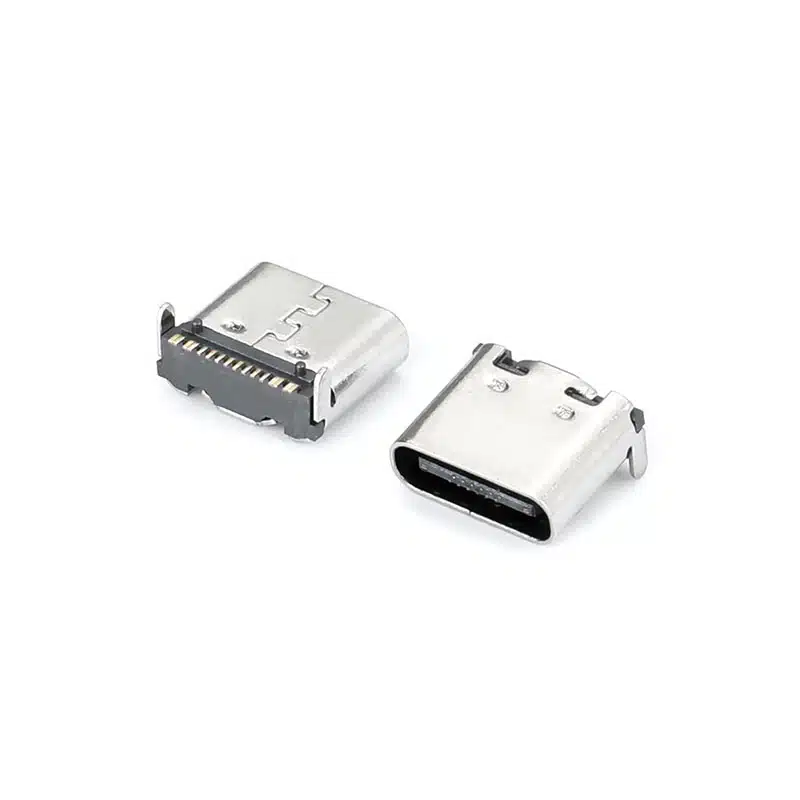
The USB-TC24-F16 is a USB Type-C connector vertical SMT 24 pin. The plug opening faces up, perpendicular to the PCB, and all 24 SMT pads sit on one side of the board. At H=6.5mm it is a low-profile option for slim devices.
It uses the full 24-pin Type-C layout: SuperSpeed TX/RX pairs for USB 3.2 Gen 2 data at 10Gbps, CC1/CC2 for configuration and Power Delivery negotiation, SBU1/SBU2 sideband lines, plus VBUS and GND. VBUS is rated 3A, which supports up to 60W (20V / 3A) with a compatible PD controller. The connector has a nickel-plated stainless steel shell for EMI shielding, gold-plated phosphor bronze contacts and an LCP housing that suits lead-free reflow. It is rated for 10,000 mating cycles.
Need a taller vertical version or one with through-hole pegs? See USB-TC24-F15 (H=9.25/10.45mm, 5A/20V) or USB-TC24-F18A (H=10.35mm). For 40Gbps designs, see the USB4 vertical receptacle. For pin assignment, see our USB-C pinout guide. For official standards, see USB-IF.
Technical Specifications
| Parameter | Value |
|---|---|
| Part Number | USB-TC24-F16 |
| Connector Type | USB Type-C Receptacle (Female, 24-pin, full-featured) |
| USB Standard | USB 3.2 Gen 2 (10Gbps), backward compatible with USB 2.0/3.0 |
| Pin Count | 24 Pins (SMT) |
| Mounting Style | Vertical SMT, reflow solderable |
| Orientation | Vertical (plug enters perpendicular to the PCB) |
| Height | H=6.5mm |
| Current Rating | 3A (VBUS) |
| Voltage Rating | 20V DC max |
| Mating Cycles | 10,000 cycles |
| Insertion Force | 5–20N |
| Withdrawal Force | 8–20N |
| Contact Material | Phosphor Bronze, Gold 30µ” over Nickel |
| Shell Material | Stainless Steel, Nickel Plated |
| Housing Material | LCP (UL94 V-0) |
| Contact Resistance | ≤40 mΩ initial |
| Insulation Resistance | ≥100 MΩ @ 100V DC |
| Dielectric Strength | 100V AC (1 minute) |
| Operating Temperature | -30°C to +85°C |
| Storage Temperature | -40°C to +90°C |
| Soldering | Reflow 260°C, 10s max, MSL 1 |
| Packaging | Tape & Reel (800 pcs/reel) |
Specifications are for reference. Please confirm against the latest datasheet before design-in, or contact our engineers.
Key Features
Full 24-pin, USB 3.2 Gen 2 up to 10Gbps
All SuperSpeed, sideband and CC pins are brought out, and DisplayPort Alt Mode signals can be carried (depends on your system design).
Low-profile vertical design, H=6.5mm
Plug enters perpendicular to the PCB; all 24 pads are on one side of the board.
Stainless steel shell with grounding springs
EMI shielding and a low-impedance ground return.
RoHS 3 & REACH compliant, SMT-friendly
Terminal coplanarity ≤0.08mm for high assembly yield.
Applications
Vertical vs Right-Angle vs Mid-Mount USB-C Connectors
A vertical receptacle like the USB-TC24-F16 takes the plug perpendicular to the PCB, so it suits designs where the enclosure panel sits parallel to the board, for example a top-facing or end-facing port. All 24 pads are on one side of the PCB, which keeps routing simple.
A right-angle (horizontal) receptacle takes the plug parallel to the PCB, from the board edge, and suits ports on the side of a device. A mid-mount receptacle sits partly in a PCB cutout to reduce height below the board surface, but the available pin count is usually lower. Choose the orientation from where the cable needs to enter your enclosure, then check the height: F16 is the low-profile option at H=6.5mm.
PCB Layout Guidelines
- Footprint: use the recommended land pattern from the 2D drawing (available on request). Solder the shell mounting tabs to dedicated anchor pads to resist cable insertion forces.
- High-speed routing: keep SuperSpeed pairs impedance-controlled at 90Ω differential, length-matched, with a solid ground reference below. Place ESD protection close to the connector pads.
- Power: route VBUS and GND with wide traces or polygons.
- SMT assembly: SAC305 paste is recommended. The part is MSL 1. Follow the reflow profile in the datasheet and inspect coplanarity after soldering.
Packaging, Compliance & Ordering Information
All USB-TC24-F16 units are shipped in sealed dry-pack tape & reel (800 pieces per 13-inch reel) with MSL 1 designation, so no pre-bake is required. The connector is lead-free and compatible with SAC305 solder. Custom options such as higher gold thickness or alternative shell plating are available on request. Standard MOQ is 1,000 pieces. To request a free sample or volume price, email sales@vistarelectronics.com with your company details and project description.
Vertical 24-Pin USB-C Receptacles: Choose by Height
| Model | Height | Mounting | Rating |
|---|---|---|---|
| USB-TC24-F16 | H=6.5mm | Vertical SMT | USB 3.2 Gen 2, 3A |
| USB-TC24-F15 | H=9.25 / 10.45mm | Vertical SMT | 5A / 20V |
| USB-TC24-F18A | H=10.35mm | Vertical SMD + through-hole pegs | 5A / 30V DC (100W Max) |
| USB4 Type-C 24 Pin Vertical SMT | H=9.25 / 10.45mm | Vertical SMT | USB4, 40Gbps |
“—” means the value is not listed on this page. Check the linked product page for the current rating or height before selecting.
Frequently Asked Questions
Does the USB-TC24-F16 support USB Power Delivery?
VBUS is rated 3A, so it supports up to 60W (20V / 3A) with a compatible PD controller. For designs that need 5A, see USB-TC24-F15 (5A / 20V). The PD controller and power path must be implemented on your board.
Can I use this connector for USB 2.0 only designs?
Yes. You can use only D+, D−, VBUS, GND and CC for a USB 2.0 or charging-only design. Unused SuperSpeed and SBU pads can be left unconnected, but connect all GND pins to the ground plane for mechanical robustness.
What is the height of USB-TC24-F16?
H=6.5mm, the low-profile option in our vertical 24-pin range. See the comparison table above for the taller F15 and F18A.
What is the difference between vertical and right-angle USB-C connectors?
A vertical receptacle takes the plug perpendicular to the PCB. A right-angle receptacle takes it parallel to the PCB, from the board edge. Choose by where the cable must enter your enclosure.
Where can I get the recommended footprint and 2D/3D drawing?
Contact us with the part number USB-TC24-F16 and we will send the 2D/3D drawing, recommended footprint and datasheet.
Is this a USB4 (40Gbps) connector?
No. It is specified for USB 3.2 Gen 2 (10Gbps). For USB4, see our USB4 vertical receptacle.
What are the MOQ, lead time and samples?
MOQ is 1,000 pcs and lead time is 2–4 weeks for production quantities. Free samples are available for qualified engineering projects. Contact sales@vistarelectronics.com.

USB 3.1 Type-C Connector — 24 Pin Vertical SMT Female Receptacle, USB-TC24-F13

USB4 Type-C Receptacle 24 Pin Single Row for 40Gbps High-Speed PCB Applications

USB Type C Surface Mount Connector 16P — USB-TC16-F04 16 Pin SMD Horizontal Receptacle with 5A Rating

USB-C Motherboard Connector SMT 24 Pin (USB-TC24-F19)

USB Type-C Receptacle 24 Pin SMD, Raised On-Board (USB-TC24-F29)

6 Pin USB Type-C Connector SMT — Right Angle USB-C Female for Compact Charging & Data Applications

24 Pin Vertical USB C Connector for SMT PCB Mounting
USB-C 16 Pin SMT On-Board Connector for USB Power Delivery & Compact High-Density PCB Design

USB-C Connector Pinout Guide for Engineers: 24-Pin vs 16-Pin Signal Assignment & PCB Routing
When moving from the pinout to a physical part, orientation matters as much as pin count. The USB-TC24-F12 (vertical SMT solder mount)...

USB-C 24-Pin Full-Featured vs. 16-Pin USB 2.0: Key PCB Layout Considerations
Understanding the differences in PCB layout between the USB-C 24-pin full-featured and 16-pin USB 2.0 connectors is crucial for ensuring stable device...
USB-C vs USB 3.0 vs USB4: Which Connector Do You Need for Your Next Design?
If you’re specifying a USB connector for a new product, you’ve probably run into three overlapping terms: USB-C, USB 3.0, and USB4....