

20 Pin Mini DisplayPort Receptacle Connector for High-Resolution Audio & Video Transmission
20 Pin Mini DisplayPort Receptacle Overview
The 20 Pin Mini DisplayPort Receptacle is a compact high‑performance connector specifically designed for modern digital audio and video transmission applications. Engineered for stable high‑speed signal transmission and compact PCB integration, this Mini DisplayPort connector provides reliable connectivity for laptops, monitors, docking stations, graphic cards, industrial display systems, and multimedia devices.
As high‑resolution display technology continues to evolve, manufacturers increasingly require durable Mini DisplayPort receptacle connectors capable of supporting stable high‑speed digital transmission and compact device integration. Mini DisplayPort technology is widely used in portable electronic devices because of its compact form factor, excellent signal performance, and compatibility with high‑resolution display standards.
This connector adopts a 20‑pin Mini DisplayPort architecture, supporting high‑definition video transmission, digital audio communication, and stable multimedia signal performance. Compared with larger display interfaces, Mini DisplayPort connectors provide space‑saving PCB integration while maintaining excellent electrical reliability and high‑speed communication capability.
The compact SMT mounting structure is optimized for automated PCB assembly and slim electronic product designs. Its precision engineering improves manufacturing efficiency while supporting reliable signal integrity in compact multimedia devices and industrial display systems.
The connector is suitable for high‑resolution display applications including 4K monitors, portable workstations, docking stations, graphic cards, gaming devices, industrial control displays, and embedded multimedia systems. Engineered for reliable mechanical durability, the connector supports repeated insertion cycles while maintaining stable electrical contact performance.
According to the official Video Electronics Standards Association (VESA), DisplayPort technology provides advanced digital display connectivity with support for high bandwidth, ultra‑high‑definition video, and high‑performance multimedia applications.
For detailed technical specifications and DisplayPort compliance information, developers can reference the official DisplayPort Standard Resources.
Additional information regarding Mini DisplayPort technology and interface compatibility can also be found at DisplayPort Product Database.
Designed for reliable signal transmission, compact PCB integration, and durable mechanical performance, the 20 Pin Mini DisplayPort Receptacle provides an ideal connectivity solution for next‑generation multimedia and display equipment.
USB-C Receptacle Dimensions and Cutout
When designing a PCB for a 24-pin USB-C mid-mount receptacle, the USB-C receptacle dimensions and the corresponding PCB cutout are the two most critical mechanical parameters. They determine whether the connector sits flush with the board edge, whether the mating cable can be inserted without interference, and whether the finished assembly fits inside the product enclosure.
USB-C Port Opening Dimensions
The standard USB-C receptacle opening measures approximately 8.94 mm wide by 3.16 mm high, with a corner radius of roughly 1.3 mm. These values describe the external port opening — the visible cutout that the USB-C plug enters. Different manufacturers may apply minor tolerances, so the exact port opening should always be verified against the selected connector’s mechanical drawing rather than assumed from the standard alone.
For enclosure design, the port opening must be slightly larger than the connector’s mating face to allow unrestricted plug insertion. A clearance of 0.1–0.2 mm per side is typically sufficient for moulded plastic or machined metal panels. If the connector is recessed behind a panel, the depth of the recess also becomes part of the USB-C port dimensions calculation.
PCB Cutout for Mid-Mount Receptacles
A mid-mount USB-C receptacle is not soldered onto the top surface of the PCB. It drops into a routed cutout so that the connector body sits partially below the board surface. This is what enables the low-profile port position that mid-mount connectors are chosen for in ultra-thin devices.
The PCB cutout for a mid-mount receptacle is therefore larger than a simple port opening. It must accommodate the connector’s body width, depth, and mounting features. Common mid-mount cutout drawings specify routing along the PCB edge with specific corner radii to match the connector housing. The cutout dimensions vary between connector series, so the PCB cutout drawing supplied by the connector manufacturer is the only reliable reference. Do not derive a mid-mount cutout from a top-mount footprint or from the port opening dimensions alone.
PCB thickness is another variable. Mid-mount connectors are often specified for a particular board thickness range — commonly 0.6 mm, 0.8 mm, or 1.6 mm. Using a connector outside its specified board-thickness range can change the connector’s centreline height relative to the PCB surface, affecting both port alignment and solderability.
Connector Body Height and Mounting Datum
For mid-mount connectors, the centreline height (CL) — the distance from the PCB surface to the centre of the connector opening — is a key datum. A lower CL means the port sits closer to the board surface, which reduces the required enclosure height but also reduces the clearance between the connector body and the underside of the board. The mechanical drawing should specify both the CL and the overall body depth so that the PCB layout engineer can confirm there is no interference with components on the opposite side of the board.
If the connector is mounted near a PCB edge, the distance from the board edge to the connector body is also critical. This edge distance determines how much board material remains around the cutout and influences the mechanical rigidity of the assembly.
Engineering note: Always request the current product drawing before finalising the PCB cutout. The values above describe standard USB-C port opening dimensions; the mid-mount PCB cutout is specific to the connector series and must be taken from the manufacturer’s drawing.
24-Pin USB-C Receptacle Pinout for PCB Design
The 24-pin USB-C receptacle pinout is the complete signal map of the connector. For PCB designers, understanding this pinout is essential for routing the Main Link differential pairs, the USB 2.0 data lines, the Configuration Channel (CC) signals, and the VBUS power rails correctly.
Receptacle Pin Assignment (Front View)
| Pin | Signal | Pin | Signal |
|---|---|---|---|
| A1 | GND | B12 | GND |
| A2 | TX1+ | B11 | RX1+ |
| A3 | TX1− | B10 | RX1− |
| A4 | VBUS | B9 | VBUS |
| A5 | CC1 | B8 | SBU2 |
| A6 | D+ | B7 | D− |
| A7 | D− | B6 | D+ |
| A8 | SBU1 | B5 | CC2 |
| A9 | VBUS | B4 | VBUS |
| A10 | RX2− | B3 | TX2− |
| A11 | RX2+ | B2 | TX2+ |
| A12 | GND | B1 | GND |
The A and B rows are not simple mirror images. They are symmetric about the connector’s central origin. When a plug is inserted upright, A5 (CC1) connects to the cable’s CC line. When flipped, B5 (CC2) takes over. This origin-symmetric layout is what enables reversible insertion without mechanical switches inside the connector.
Signal Groups for PCB Routing
VBUS and GND: Four VBUS pins (A4, A9, B4, B9) and four GND pins (A1, A12, B1, B12) run in parallel. This reduces contact resistance and enables high-current power delivery. On the PCB, VBUS and GND should be routed with adequate copper width for the rated current — typically 5A for a full-featured 24-pin receptacle.
SuperSpeed Differential Pairs: The 24-pin pinout provides four SuperSpeed differential pairs — TX1+/− (A2/A3), RX1+/− (B11/B10), RX2+/− (A10/A11), and TX2+/− (B3/B2). These pairs carry high-speed data for USB 3.2 Gen 2 (10 Gbps) and USB4 (up to 40 Gbps). On the PCB, they require controlled-impedance routing, matched trace lengths within each pair, and a continuous reference plane.
USB 2.0 Data: Pins A6/A7 and B6/B7 carry the USB 2.0 D+ and D− signals. Both pairs are typically connected to a single USB 2.0 transceiver on the PCB. These signals are less critical than the SuperSpeed pairs but should still be routed with reasonable care to avoid excessive stub lengths.
Configuration Channel (CC1/CC2): Pins A5 and B5 are the CC lines. They detect plug orientation, establish power roles, and negotiate USB Power Delivery contracts. The CC traces should be routed to the PD controller with appropriate pull-down resistors (for a sink) or pull-up resistors (for a source). Both CC1 and CC2 must be routed because the connector orientation is not known in advance.
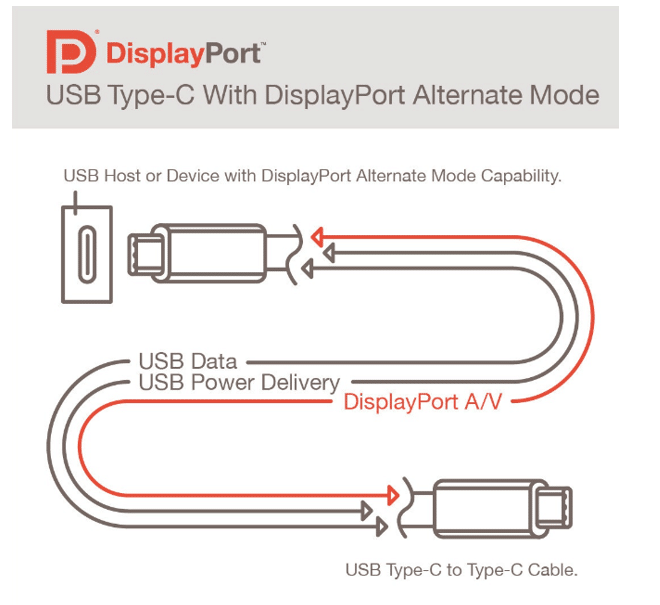
Sideband Use (SBU1/SBU2): Pins A8 and B8 are the sideband pins. They are used for Alternate Mode functions such as DisplayPort AUX channel or analog audio. If Alt Mode is not used in the design, the SBU pins can be left unconnected or terminated according to the system requirements.
PCB Footprint Considerations
The pinout table above describes the electrical assignment. The physical PCB footprint — pad positions, pad sizes, and terminal spacing — must come from the connector manufacturer’s recommended land pattern. A mid-mount SMT connector may have two rows of SMT pads plus additional through-hole anchor pins for mechanical retention. The footprint drawing should be followed exactly; do not derive pad positions from the pinout table alone.
For a more detailed explanation of USB-C pin functions and the differences between 24-pin, 16-pin, and 6-pin configurations, see our USB-C Connector Pinout Guide.
USB-C Female Receptacle PCB Mounting Options
The USB-C female receptacle PCB mounting option determines how the connector is attached to the board, how much vertical space it consumes, and how much mechanical stress it can withstand. There is no single “best” mounting style — the right choice depends on the enclosure height, the expected number of mating cycles, and the assembly process.
SMT Top-Mount
The connector sits entirely on the top surface of the PCB. All signal and anchor pads are SMT-soldered to the top layer. This is the most straightforward mounting style for reflow assembly, but it also consumes the most vertical height above the board. It is suitable for products where enclosure height is not the primary constraint.
Mid-Mount (Sinking)
A mid-mount receptacle drops into a PCB cutout so that part of the connector body sits below the board surface. This reduces the height above the PCB, enabling thinner enclosures. The trade-off is a more complex PCB fabrication step (routing the cutout) and a footprint that is specific to the connector series. Mid-mount is commonly used in tablets, ultra-thin laptops, and compact consumer devices where every millimetre of vertical space matters.
Top-Mount vs Mid-Mount vs Bottom-Mount
USB-C receptacles can be mounted on the top of the PCB, recessed into a cutout (mid-mount), or mounted on the bottom side of the board. Bottom-mount connectors are less common for receptacles but can be useful when the port must face downward relative to the main component side. The GCT USB orientation guide describes these distinctions: a top mid-mount fits into a PCB hole and is soldered to the top side, while a bottom mid-mount is soldered from the opposite side.
Through-Hole Anchor Pins
Many mid-mount and top-mount USB-C receptacles include through-hole anchor pins in addition to the SMT signal pads. These pins pass through the PCB and are wave-soldered or selective-soldered from the back side. They provide significantly stronger mechanical retention than SMT pads alone, which is important because a USB-C port experiences repeated insertion and extraction forces. The combination of SMT signal pads and through-hole anchors is sometimes called a hybrid mounting configuration.
Back-Mount and PCB Edge Mounting
Some USB-C receptacles are designed for board-edge or back-mount configurations, where the connector is positioned at the edge of the PCB rather than in the centre of the board. This can be useful when the port must align with a side panel or rear panel opening. The connector orientation — right-angle, vertical, or horizontal — determines which direction the cable enters relative to the PCB. For a mid-mount right-angle receptacle, the cable exits parallel to the board, which is the configuration used in most thin devices.
Choosing a Mounting Style
When selecting a mounting style, consider the following factors:
- Enclosure height: Mid-mount reduces height above the PCB; top-mount requires more vertical clearance.
- PCB thickness: Mid-mount connectors are often specified for a particular board thickness range.
- Mechanical stress: Through-hole anchors provide stronger retention than pure SMT.
- Assembly process: SMT-only connectors are reflow-compatible; hybrid connectors require an additional wave or selective solder step.
- Port orientation: Right-angle for side-exit cables; vertical for top-exit cables.
- Cutout complexity: Mid-mount requires a routed PCB cutout; top-mount does not.
The product on this page is a 24-pin mid-mount SMT receptacle with a right-angle configuration. Its mounting style reduces the height above the PCB and positions the port for side-entry cable access, which is the appropriate choice for compact, thin-profile electronic equipment.
20 Pin Mini DisplayPort Connector Specifications
| Parameter | Specification |
|---|---|
| Product Name | 20 Pin Mini DisplayPort Receptacle |
| Part Number | DP-MN-F02 |
| Connector Type | Mini DisplayPort Female Receptacle |
| Pin Count | 20 Pins |
| Interface Standard | Mini DisplayPort |
| Mounting Type | SMT / PCB Mount |
| Connector Orientation | Horizontal |
| Contact Material | Copper Alloy |
| Housing Material | High Temperature Thermoplastic |
| Current Rating | 0.5A |
| Voltage Rating | 30V AC/DC |
| Operating Temperature | -40°C to +85°C |
| Durability | 10,000 Mating Cycles |
| Application | Audio & Video Transmission |
Mini DisplayPort Receptacle Key Features
Mini DP Connector Applications
Ultrabooks, notebooks, portable workstations, and compact computing devices.
4K monitors, industrial display panels, multimedia displays, and commercial monitor systems.
Mini DisplayPort docking stations, multimedia hubs, and video interface adapters.
Gaming systems, external GPU modules, multimedia consoles, and high‑performance graphic equipment.
Industrial HMI displays, embedded multimedia systems, and automation equipment.
Broadcast devices, digital signage systems, conference equipment, and video processing systems.
Mini DisplayPort Receptacle FAQ
What is a Mini DisplayPort receptacle?
What devices use Mini DisplayPort connectors?
Does this connector support high‑resolution displays?
What is the advantage of Mini DisplayPort?
Is this connector suitable for industrial equipment?
What is the durability rating of this connector?

DisplayPort connector female right angle DIP 20 pin

Right-angle Display Port connector SMT 20 pin heighten type

20-Pin Vertical DisplayPort Connector SMT with Metal Spring Clip — DP-F06B Female Receptacle for 8K Display Applications

DisplayPort Mini connecor 20 pin mini DP plug for wire soldering

20 pin Mini DisplayPort receptacle right agnle

DisplayPort Plug 20 Pin Straddle Mount PCB Connector — DP-M-01 DP Male Clamp 1.6mm for Cable & Panel Assemblies

right angle displayport connector female 20p SMT

Vertical Displayport connector 20 Pin SMT H=15mm

DisplayPort 1.4 vs 2.1 for PCB Design: Connector Selection & Routing Guide
Your product spec sheet promises DisplayPort 2.1 output — 8K, 240Hz, the works. But when your procurement team pulls connector options, half...
How to Check if a USB-C Port Supports DP Alt Mode — 5 Methods Explained
Quick AnswerNot every USB-C port supports DisplayPort Alt Mode — it depends on the port’s pin configuration and the host controller behind...

DisplayPort Pinout Guide: 20-Pin Connector Functions, Wiring & PCB Layout
A video interface that works on the lab bench can fail in the field for a reason that never appears on a...