DisplayPort Pinout Guide: 20-Pin Connector Functions, Wiring & PCB Layout

DisplayPort Pinout: 20-Pin Critical Guide & Expert Tips

A video interface that works on the lab bench can fail in the field for a reason that never appears on a schematic: the DisplayPort connector’s pinout was treated as a wiring formality instead of a signal-integrity boundary. One engineering team I worked with spent two weeks chasing intermittent 4K flicker on a medical monitor. … Read more

Right Angle vs Vertical DisplayPort Connector: Complete PCB Design Guide

right angle vs vertical DisplayPort

Compare right angle vs vertical DisplayPort connectors for PCB mounting. Learn about mechanical fit, PCB layout, applications, and how to choose the right DisplayPort connector for your design. You are laying out a new industrial display controller. The enclosure has a rear panel cutout for video output, and the PCB sits parallel to the back … Read more

DisplayPort 1.4 vs 2.1: Full Bandwidth, Resolution & Compatibility Comparison

DisplayPort 1.4 vs 2.1

What’s the Latest DisplayPort Version? As of 2026, the latest DisplayPort version is DisplayPort 2.1, released by VESA in 2022 and updated to 2.1b in 2025. It supports up to 80 Gbps raw bandwidth (77.37 Gbps effective) via UHBR20, compared to DisplayPort 1.4’s 32.4 Gbps (25.92 Gbps effective) via HBR3 — a 3× increase. DP … Read more

DisplayPort vs HDMI: 12 Key Differences, Pros, Cons & How to Choose (2026 Guide)

DisplayPort vs HDMI

DisplayPort vs HDMI: Compare bandwidth, resolution, refresh rate, gaming performance, compatibility and connector types. Learn which interface is best for monitors, TVs and industrial displays. You are specifying the display interface for a new industrial monitor. The customer requirements call for 4K resolution at 120Hz, daisy-chain capability for a three-screen setup, and long-term reliability in … Read more

How to Choose DisplayPort Connector for Your PCB Design– Complete Guide

How to Choose the Right DisplayPort Connector

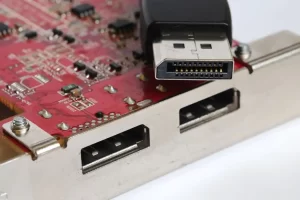
Learn how to choose DisplayPort connector for PCB projects. Compare 20-pin types, SMT vs through-hole, mounting height, footprint, signal integrity and mechanical requirements. You have a PCB layout open in Altium. The enclosure is nearly finalized. You know the product needs a DisplayPort output. The question is not whether to use DisplayPort — it’s which … Read more

How to Clean the DisplayPort Connector Port and Troubleshoot DisplayPort Handshake Issues

displayport connector

Cleaning the DisplayPort connector and troubleshooting handshake failures can be addressed from the following two main aspects. Properly Cleaning the DisplayPort Connector Port Poor physical connection is a common cause of issues like black screens or flickering. Before attempting complex software settings, ensure the port and cable are clean and securely connected. You will need: … Read more

How to fix DisplayPort no signal

DisplayPort no signal

DisplayPort no signal issues are usually caused by physical connection problems, incorrect signal source selection, graphics card drivers, or settings. Please follow the steps below, starting with the most common causes and progressing to more complex ones. Step-by-Step Troubleshooting Guide You can follow this flowchart to quickly pinpoint the problem of DisplayPort no signal. It … Read more

Top DisplayPort Connector Manufacturers in 2025 — How to Choose the Right Supplier for Your PCB Design

DisplayPort connector manufacturers

Choosing DisplayPort connector manufacturers? Evaluate contact plating, SMT vs DIP, shielding, and MOQ. Avoid the 3 most costly sourcing mistakes. Engineer’s guide to qualifying reliable DisplayPort suppliers. Choosing a DisplayPort Connector Manufacturer: Parameters That Matter A digital signage integrator ordered 5,000 DisplayPort receptacles for a video wall controller. The parts matched the footprint, the pin … Read more

How to Check if a USB-C Port Supports DP Alt Mode — 5 Methods Explained

usb type-c with dp alt mode

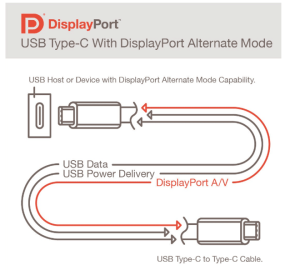
Quick AnswerNot every USB-C port carries DisplayPort Alt Mode. To determine if your USB-C port can output video, look for a DisplayPort (DP) logo or a Thunderbolt symbol next to the port, check the device manufacturer’s technical specifications for “DisplayPort Alt Mode” or “DP Alt Mode” support, or confirm that the USB-C port is a … Read more

DisplayPort for VR and AR: Bandwidth, Refresh Rate and Display Design

DisplayPort for VR

A VR headset can render a flawless image in the GPU frame buffer and still deliver a nauseating experience if the display link cannot transport that data fast enough. The problem is rarely the rendering engine; it is often the display interface. When an engineer selects a connector and cable system for a VR or … Read more

Request a Quote

    Inquiry for:

    Loading product...