
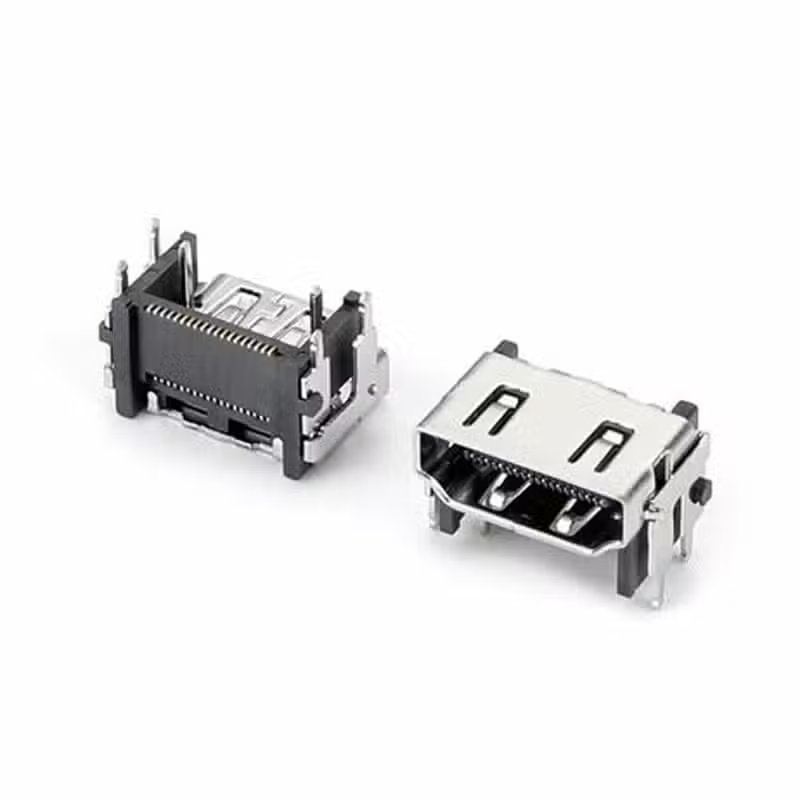
DisplayPort SMT Right Angle Connector — 20 Pin Female PCB Receptacle
20 Pin DisplayPort SMT Connector — Product Overview (Right Angle DisplayPort Connector for PCB Mounting)
This DisplayPort SMT right angle connector is a 20-pin female PCB receptacle designed for compact electronic equipment that requires side-entry DisplayPort connectivity. Its right-angle configuration allows the mating cable to exit parallel to the PCB, making it suitable for monitors, desktop computers, docking stations, industrial displays, embedded systems, and other space-constrained designs.
This 20 pin DisplayPort SMT connector is intended for DisplayPort 1.4 applications and provides the standard 20-pin interface used for high-speed digital video, audio, auxiliary channel communication, and Hot Plug Detect. Engineers can select the right-angle configuration when the DisplayPort port needs to align with a chassis side or rear-panel opening while keeping the connector integrated with the PCB.
Engineered to meet VESA DisplayPort standards, this right angle DisplayPort connector supports HBR3 transmission at 8.1 Gbps per lane across four lanes, delivering total throughput up to 32.4 Gbps. This enables uncompressed 8K resolution at 60Hz, 5K at 60Hz, and 4K at 120Hz with HDR — making it suitable for high-refresh-rate gaming monitors, professional video editing stations, medical imaging displays, and VR/AR headsets.
The right-angle SMT configuration allows engineers to optimize board space in slim-profile devices while maintaining robust mechanical stability. Manufactured in an ISO 9001:2015 certified facility, this DisplayPort 1.4 SMT connector is fully compliant with RoHS 3 and REACH regulations. For comprehensive DisplayPort technical specifications, refer to the VESA DisplayPort Standard documentation.
Right Angle DisplayPort Connector — Full Technical Specifications
Below are the complete specifications for the right angle DisplayPort connector DP-F13A, covering electrical, mechanical, and environmental ratings.
| Parameter | Specification | Notes |
|---|---|---|
| Part Number | DP-F13A | Standard catalog item |
| Product Name | DisplayPort 1.4 Connector SMT Right Angle | 20-pin female receptacle |
| Connector Type | DisplayPort 1.4 Receptacle | Full-size DisplayPort |
| Pin Count | 20 Pins | Full DP signal + power + GND |
| Mounting Type | SMT (Surface Mount Technology) | Right-angle orientation |
| Orientation | Right Angle | Cable exit parallel to PCB |
| Current Rating | 0.5A per contact | Signal contacts |
| Insertion Force | ≤ 35N | Maximum |
| Withdrawal Force | ≥ 8N | Minimum retention |
| Mating Cycles | 5,000 cycles | Commercial grade durability |
| Data Rate Support | Up to 32.4 Gbps (HBR3) | DisplayPort 1.4 |
| Resolution Support | 8K@60Hz / 4K@120Hz / 5K@60Hz | With DSC support |
| Contact Material | Phosphor Bronze | Gold plated |
| Housing Material | LCP (High-Temperature) | UL94V-0, reflow compatible |
| Shell Material | Stainless Steel | EMI shielding |
| Operating Temperature | -25°C to +85°C | Commercial / industrial grade |
| Packaging | Reel / Tray | SMT assembly ready |
| Compliance | RoHS 3, REACH | Global export ready |
Specifications should be verified against the latest product drawing and engineering documentation before production release. Electrical performance depends on the complete system design, including PCB layout, cable assembly, and PHY implementation.
20 Pin DisplayPort SMT Connector — Interface Architecture
A 20 pin DisplayPort SMT connector provides the standard full-size DisplayPort interface in a surface-mount package suitable for automated PCB assembly. The 20 pins carry the complete DisplayPort signal set — four Main Link differential pairs for high-speed video and audio, the AUX channel for EDID and HDCP communication, Hot Plug Detect, and DP power.
The 20-pin configuration supports the full range of DisplayPort functionality, including Multi-Stream Transport (MST) for daisy-chaining multiple monitors, Display Stream Compression (DSC) for higher resolutions and refresh rates, and backward compatibility with earlier DisplayPort versions. When paired with a compatible DisplayPort 1.4 source and cable, this connector enables 8K@60Hz, 5K@60Hz, and 4K@120Hz video transmission.
The surface-mount termination allows the connector to be integrated into automated reflow soldering processes, reducing assembly steps and improving production consistency. The compact footprint makes this 20 pin DisplayPort SMT connector suitable for high-density PCB layouts where board space is limited.
Right Angle DisplayPort Connector — PCB Mounting Design
A right angle DisplayPort connector positions the mating interface parallel to the PCB surface, enabling side-entry cable connections that minimize vertical height requirements. This orientation is particularly useful in slim devices where vertical clearance is limited and in equipment where the DisplayPort port needs to align with a side-panel or rear-panel opening.
The right-angle configuration allows the connector to be placed at the PCB edge with the port opening facing outward. This simplifies enclosure design by allowing the cable to enter from the side rather than the top of the device. For monitors, desktop computers, and docking stations, the right-angle orientation often provides a more natural cable routing path compared to vertical connectors.
When designing with a right angle DisplayPort connector, engineers should consider the PCB edge clearance, connector alignment with the enclosure opening, and the cable bending radius. The connector should be positioned so that the mating cable can be inserted and removed without interference from adjacent components or enclosure walls.
For a comparison of different mounting orientations, see our right-angle vs vertical DisplayPort connector guide.
DisplayPort 1.4 SMT Connector — High-Speed Display Applications
A DisplayPort 1.4 SMT connector supports the HBR3 (High Bit Rate 3) transmission standard at 8.1 Gbps per lane across four lanes, delivering total bandwidth up to 32.4 Gbps. This enables uncompressed 8K resolution at 60Hz, 5K at 60Hz, and 4K at 120Hz with HDR, making it suitable for next-generation display applications.
The DP-F13A is designed for DisplayPort 1.4 applications including gaming monitors with high refresh rates, professional graphics workstations for video editing and 3D rendering, medical imaging displays, digital signage, and VR/AR headsets. The connector is backward compatible with DisplayPort 1.2, 1.1, and 1.0 devices, automatically negotiating the appropriate link rate and lane configuration.
For protocol-level requirements, engineers should refer to the official VESA DisplayPort standards when validating a DisplayPort interface design. The connector itself provides the physical interface; the actual supported DisplayPort version depends on the source chipset, cable, and sink display.
Right Angle DP Connector for PCB — Design Considerations
A right angle DP connector for PCB should be selected according to both electrical and mechanical requirements. The connector needs to align accurately with the enclosure opening while maintaining enough clearance for the mating plug and cable. At the PCB level, the footprint must provide appropriate pads, mounting features, grounding connections, and routing space.
High-speed differential pairs require particular attention during PCB layout. The Main Link lanes should be routed with controlled impedance, matched lengths, and minimal discontinuities. The AUX channel and Hot Plug Detect signals also require appropriate routing to ensure reliable communication between the source and display.
When integrating this right angle DP connector for PCB into your design, consider the following:
- PCB Edge Clearance: Position the connector at the board edge with adequate space for the mating plug and cable bending radius.
- High-Speed Routing: Route Main Link differential pairs with controlled impedance and matched lengths.
- Grounding: Connect the connector shell to the PCB ground plane for effective EMI shielding.
- Mechanical Support: Ensure adequate PCB support for the connector to withstand cable insertion and withdrawal forces.
For a vertical mounting alternative, see our 20-pin vertical DisplayPort connector SMT.
DisplayPort SMT Right Angle Connector — Key Features and Advantages
8K@60Hz & 4K@120Hz Video Support
HBR3 transmission at 32.4 Gbps enables uncompressed 8K resolution and high-refresh-rate 4K gaming — critical for next-generation displays and professional visualization.
20-Pin Full-Function Architecture
Complete Main Link lanes (4×), AUX channel, Hot Plug Detect, and DP Power deliver full DisplayPort 1.4 functionality including MST and DSC support.
SMT Right-Angle Space-Saving Design
The low-profile right-angle SMT configuration maximizes PCB real estate and simplifies enclosure integration for side-panel DisplayPort ports.
5,000-Cycle Mating Durability
Engineered for 5,000 insertion/withdrawal cycles with 35N max insertion and 8N min withdrawal forces — ideal for devices requiring frequent cable connection.
0.5A Power Delivery per Contact
Robust contact design supports 0.5A current rating per pin, ensuring stable power delivery for DisplayPort auxiliary functions and connected peripherals.
RoHS 3 & REACH Compliant
Lead-free construction meets global environmental standards for sustainable manufacturing and unrestricted export to regulated markets.
Applications of DisplayPort SMT Right Angle Connector
As a versatile DisplayPort SMT right angle connector, the DP-F13A is found across a wide range of applications where reliable high-bandwidth video transmission is required in a compact PCB-mountable package.
Right Angle vs Vertical DisplayPort Connector — Which One to Choose?
When selecting a DisplayPort connector for your PCB, understanding the differences between right-angle and vertical mounting is essential.
| Feature | Right Angle (DP-F13A) | Vertical |
|---|---|---|
| Cable Direction | Parallel to PCB — side exit | Perpendicular to PCB — top exit |
| Vertical Space | Low profile — minimal height above PCB | Higher profile |
| PCB Edge Mounting | Excellent — ideal for edge placement | Moderate — depends on design |
| Best For | Monitors, docking stations, desktop PCs | Rear-panel I/O, embedded systems |
| Cable Routing | Horizontal — parallel to board | Vertical — perpendicular to board |
The DP-F13A is a right-angle connector. Choose this when your PCB layout requires a low-profile DisplayPort port with horizontal cable exit. For applications requiring vertical cable exit, consider our 20-pin vertical DisplayPort connector SMT.
DisplayPort SMT Right Angle Connector — Frequently Asked Questions
What is a DisplayPort SMT right angle connector?
A DisplayPort SMT right angle connector is a surface-mount DisplayPort receptacle that positions the mating interface parallel to the PCB surface. The DP-F13A is a 20-pin female version designed for side-entry DisplayPort connectivity in compact electronic equipment.
Why choose a right-angle DisplayPort connector for PCB mounting?
A right-angle DisplayPort connector reduces vertical height requirements and enables side-entry cable connections. This makes it ideal for slim devices, monitors, and equipment where the DisplayPort port must align with a side-panel or rear-panel opening.
How many pins does a standard DisplayPort connector have?
A standard full-size DisplayPort connector has 20 pins. These pins carry four Main Link differential pairs for video and audio, the AUX channel for EDID and HDCP communication, Hot Plug Detect, and DP power.
Is this DisplayPort SMT connector suitable for DisplayPort 1.4 applications?
Yes. The DP-F13A is designed for DisplayPort 1.4 applications, supporting HBR3 transmission at 32.4 Gbps total bandwidth. This enables 8K@60Hz, 5K@60Hz, and 4K@120Hz video output when paired with compatible source and display devices.
What is the difference between a right-angle and vertical DisplayPort connector?
A right-angle DisplayPort connector positions the cable parallel to the PCB, while a vertical connector positions the cable perpendicular to the board. Right-angle connectors are preferred for slim devices and edge-mount applications; vertical connectors are used for rear-panel I/O and top-access ports.
What is the maximum resolution supported by this DisplayPort 1.4 connector?
This DisplayPort 1.4 connector SMT supports HBR3 transmission at 32.4 Gbps total bandwidth, enabling 8K resolution at 60Hz, 5K at 60Hz, 4K at 120Hz, and 1080p at 240Hz. It also supports Display Stream Compression (DSC) for even higher resolutions.
Is this connector compatible with DisplayPort 1.2 and earlier cables?
Yes. DisplayPort 1.4 is backward compatible with DisplayPort 1.2, 1.1, and 1.0 cables and devices. When connected to HBR2 or lower-capability devices, the 20 pin DisplayPort connector automatically negotiates the appropriate link rate and lane configuration.
What is the MOQ and can I get a free sample?
Standard MOQ is 1,000 pieces with a 2–4 week production lead time. Free samples are available for qualified engineering and product development projects. Contact sales@vistarelectronics.com with your company details, project description, and part number (DP-F13A).
DisplayPort SMT Right Angle Connector — Complete Guide for Engineers and Procurement Professionals
What Is a DisplayPort SMT Right Angle Connector?
A DisplayPort SMT right angle connector is a surface-mount DisplayPort receptacle that positions the mating interface parallel to the PCB surface. The DP-F13A is a 20-pin female version designed for compact electronic equipment that requires side-entry DisplayPort connectivity. Its right-angle configuration allows the mating cable to exit parallel to the PCB, making it suitable for monitors, desktop computers, docking stations, industrial displays, embedded systems, and other space-constrained designs.
This 20 pin DisplayPort SMT connector provides the standard full-size DisplayPort interface in a surface-mount package suitable for automated PCB assembly. The 20 pins carry the complete DisplayPort signal set — four Main Link differential pairs for high-speed video and audio, the AUX channel for EDID and HDCP communication, Hot Plug Detect, and DP power.
Right Angle DisplayPort Connector — PCB Mounting Design
A right angle DisplayPort connector positions the mating interface parallel to the PCB surface, enabling side-entry cable connections that minimize vertical height requirements. This orientation is particularly useful in slim devices where vertical clearance is limited and in equipment where the DisplayPort port needs to align with a side-panel or rear-panel opening.
When designing with a right-angle DisplayPort connector, engineers should consider the PCB edge clearance, connector alignment with the enclosure opening, and the cable bending radius. The connector should be positioned so that the mating cable can be inserted and removed without interference from adjacent components or enclosure walls.
DisplayPort 1.4 SMT Connector — High-Speed Display Applications
A DisplayPort 1.4 SMT connector supports HBR3 transmission at 8.1 Gbps per lane across four lanes, delivering total throughput up to 32.4 Gbps. This enables uncompressed 8K resolution at 60Hz, 5K at 60Hz, and 4K at 120Hz with HDR, making it suitable for gaming monitors, professional graphics workstations, medical imaging displays, and VR/AR headsets.
The DP-F13A is backward compatible with DisplayPort 1.2, 1.1, and 1.0 devices, automatically negotiating the appropriate link rate and lane configuration. For protocol-level requirements, engineers should refer to the official VESA DisplayPort standards when validating a DisplayPort interface design.
Applications Across Industries
This right angle DP connector for PCB is widely used across multiple industries. Gaming monitors use it for high-refresh-rate displays. Professional graphics workstations use it for video editing and 3D rendering. Medical imaging systems use it for diagnostic displays. Industrial control panels use it for HMI interfaces. Docking stations and broadcast equipment also rely on the DP-F13A for reliable high-bandwidth video transmission.
Why Choose Vistar as Your DisplayPort Connector Supplier
Vistar Electronics is a trusted manufacturer and supplier of DisplayPort connectors serving customers in consumer electronics, industrial automation, medical devices, and professional AV markets. Our DisplayPort connector lineup includes right-angle, vertical, and mid-mount configurations with SMT and through-hole mounting options.
With ISO 9001:2015 certification and a commitment to continuous improvement, Vistar is your reliable partner for high-quality interconnect solutions. For more technical resources, including PCB layout guidelines and connector selection guides, visit our technical blog or contact our engineering support team directly.
Explore our full range of DisplayPort connectors and related content:
Technical Reference and Industry Standards
For DisplayPort interface design and qualification, engineers should reference the applicable VESA standards together with the requirements of the selected source and sink devices. The following official resources provide useful background information:
These references are provided for engineering and compliance background. The applicable requirements for the finished equipment should be determined according to the product category, destination market, and customer specifications.
Need Custom DisplayPort Connector Solutions?
Vistar Electronics manufactures DisplayPort connectors in right-angle, vertical, and mid-mount configurations with SMT and through-hole mounting options. Custom heights, plating, and packaging available for OEM projects.
DP-F13A — DisplayPort SMT Right Angle Connector | 20-Pin Female PCB Receptacle | RoHS 3 & REACH Compliant | OEM/ODM Available

DP Connector 20 Pin Clamp PCB — Straddle Mount DisplayPort Male Connector for High-Speed Video Output, Embedded Systems & Industrial Boards

Superior 20-Pin DisplayPort PCB Connector – Reliable 1.6mm Clamp Board

Vertical Displayport connector 20 Pin SMT H=15mm

Mini DisplayPort PCB Connector 20-Pin — DP-MN-F01 Panel Mount Clamp for 4K & Industrial PCB Design

20 Pin DisplayPort SMT Top Mount Connector — DP-F-02 Female PCB Receptacle for Monitors & Industrial Displays

20 Pin Mini DisplayPort Receptacle Connector for High-Resolution Audio & Video Transmission

Mid-mount mini DP connector right angle 20pin SMT/DIP

Surface Mount DisplayPort connectors 20 pin DP female SMT right angle

DisplayPort 1.4 vs 2.1: Full Bandwidth, Resolution & Compatibility Comparison
What’s the Latest DisplayPort Version? As of 2026, the latest DisplayPort version is DisplayPort 2.1, released by VESA in 2022 and updated...

DisplayPort Pinout Guide: 20-Pin Connector Functions, Wiring & PCB Layout
A video interface that works on the lab bench can fail in the field for a reason that never appears on a...

How to Choose DisplayPort Connector for Your PCB Design– Complete Guide
Learn how to choose DisplayPort connector for PCB projects. Compare 20-pin types, SMT vs through-hole, mounting height, footprint, signal integrity and mechanical...