
You are specifying connectors for a new product. The datasheet calls for a modular jack. You look at the footprint—eight contacts. Your procurement team asks: “Can we use the same part we use for telephones?”
The short answer is no. The longer answer involves understanding why these two connectors look similar but serve entirely different purposes—and why confusing them can damage equipment, degrade performance, and create field failures.
RJ45 vs RJ11 are among the most common modular connectors in the world. Both are rectangular, both use a latching mechanism, and both terminate twisted-pair cables. But that is where the similarity ends. One is built for high-speed digital data transmission over Ethernet networks. The other is designed for analog voice signals over telephone lines. They are not interchangeable, and attempting to force one into the other’s socket invites trouble.
This guide breaks down the technical differences between RJ45 and RJ11 connectors—pin configurations, physical dimensions, wiring standards, applications, and selection criteria. Whether you are designing a network interface, a telephony system, or an industrial control panel, understanding these two connector families is essential.
What Is an RJ45 Connector?
RJ45 stands for Registered Jack 45. It is a standardized 8-position, 8-contact (8P8C) modular connector used to terminate Ethernet cables and establish wired network connections.
The RJ45 connector has eight pins, arranged in four twisted pairs, which allows it to support the complex and high-speed transmission demands of Ethernet-based systems. It is the physical interface for local area network (LAN) devices, ensuring stable data transmission across Cat5e, Cat6, and Cat6A cables.
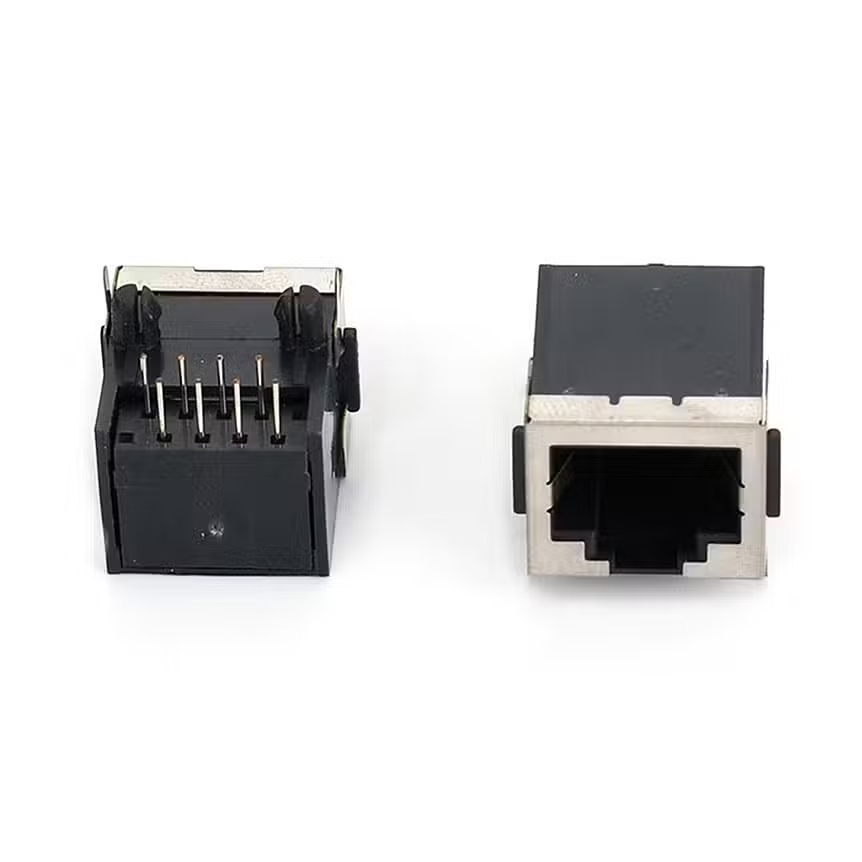
Key characteristics of RJ45 connectors:
- Pin count: 8 pins (8P8C configuration)
- Physical size: Larger and wider than RJ11, approximately 50% bigger
- Wiring standards: T568A and T568B
- Data speed: Supports from 10 Mbps to 10 Gbps and above
- Cable types: Cat5, Cat5e, Cat6, Cat6a
- Maximum cable length: 100 meters (328 feet), including 90 meters of horizontal cabling plus 10 meters of patch cords
- Locking tab: Secures the connection and provides tactile feedback when engaged
Common applications for RJ45 connectors:
- Ethernet networking—connecting computers, routers, switches, and servers
- Power over Ethernet (PoE)—supplying both data and power to IP cameras, wireless access points, and VoIP phones
- Industrial automation—connecting PLCs, sensors, and HMIs in factory environments
- IP surveillance cameras—CCTV and security systems requiring consistent bandwidth and long cable runs
- Smart home and IoT systems—connecting hubs, controllers, and smart devices
RJ45 connectors are available in both unshielded (UTP) and shielded (STP) variants. UTP connectors are cost-effective and suitable for low-interference environments like homes and offices. STP connectors include additional foil or braided shielding to protect signals from electromagnetic interference, making them ideal for industrial facilities, data centers, and areas with heavy electrical noise.
Internal link: Explore our RJ45 Modular Jacks —available in shielded and unshielded configurations, single and multi-port options, with and without magnetics, for networking and industrial Ethernet applications.
What Is an RJ11 Connector?
RJ11 stands for Registered Jack 11. It is a connector standard primarily used for telephone system wiring. RJ11 connectors are designed specifically to work with analog telephone lines, making them essential for standard telephone systems.
Most RJ11 connectors use a 6-position, 4-contact (6P4C) configuration, meaning there are six possible positions with four places for contacts. However, typically only the two center pins are actually used for single-line telephone connections. Some variants use 6P2C (two contacts) for basic single-line phones or 6P6C (six contacts) for two-line telephone systems.
Key characteristics of RJ11 connectors:
- Pin count: Typically 4 pins (6P4C), sometimes 2 pins (6P2C) or 6 pins (6P6C)
- Physical size: Smaller and narrower than RJ45
- Wiring: Primarily single-pair twisted copper wires for voice signals
- Bandwidth: Suitable for voice transmission with low data rate demands
- Cable type: Flat, stranded wire typical of telephone cables
- Data capability: Limited to analog voice; cannot support high-speed Ethernet
Common applications for RJ11 connectors:
- Single-line landline telephones
- DSL modems—connecting the phone line to the modem for internet access
- Fax machines and dial-up modems
- Home alarm and security systems
RJ11 connectors are small, usually designed with a clear plastic body and gold-plated contacts. They are simple, reliable, and still found in many homes and offices despite the rise of VoIP and wireless communication.
Internal link: For a comprehensive overview of modular connectors, see our Phone Jack Guide: 3.5mm & 2.5mm TRS/TRRS Audio Jacks —the principles of connector selection apply across all modular connector types.
RJ45 vs RJ11: Direct Comparison

| Feature | RJ45 | RJ11 |
|---|---|---|
| Full Name | Registered Jack 45 | Registered Jack 11 |
| Pin Configuration | 8P8C (8 pins) | 6P4C or 6P2C (4 or 2 pins) |
| Physical Size | Larger, wider | Smaller, narrower |
| Primary Use | Ethernet networking | Telephone systems |
| Signal Type | Digital data | Analog voice |
| Data Speed | Up to 10 Gbps+ | Voice-grade only (low-speed data for DSL) |
| Cable Type | Cat5e, Cat6, Cat6A (twisted pair) | Flat telephone wire |
| Max Cable Length | 100 meters | Varies (typically shorter for voice) |
| Wiring Standards | T568A / T568B | Single-pair telephone wiring |
| Locking Tab | Yes | Yes |
| Interchangeable? | No—RJ11 can fit in RJ45 socket (not recommended), but RJ45 cannot fit in RJ11 |
The most immediate difference between RJ45 and RJ11 is the number of wires and pins they support. RJ45, with its eight contacts, is larger than the six-contact RJ11. RJ11’s narrower design is adequate for the less demanding transmission of telephone signals, while RJ45’s eight-pin configuration handles the high-speed demands of Ethernet.
Physical Differences: Why They Are Not Interchangeable
The physical dimensions of RJ45 and RJ11 are the primary reason they are not interchangeable—though the relationship is asymmetrical.
RJ45 plug into RJ11 socket: An RJ45 plug is larger and wider than an RJ11 socket. It cannot physically fit into an RJ11 jack.
RJ11 plug into RJ45 socket: An RJ11 plug can fit into an RJ45 socket because it is smaller. This is where the danger lies.
Plugging an RJ11 connector into an RJ45 socket is not recommended and is strongly advised against. RJ11 and RJ45 are utilized for different purposes. Inserting an RJ11 plug into an RJ45 socket can:
- Damage the socket’s pins (the RJ11 plug’s narrower body may not align correctly with all eight contacts)
- Damage the plug itself
- Result in improper connections or performance problems
- In some cases, damage networking equipment or phone line functionality
The visual similarity between the two connectors makes this mistake easy—especially when reaching behind a device to plug things in without looking. Always verify the connector type before mating.
Wiring and Pinout
RJ45 Pinout (T568B Standard)
The T568B wiring standard is the most common for RJ45 connectors in commercial installations in the United States.
| Pin | Pair | Wire Color (T568B) |
|---|---|---|
| 1 | Pair 2 | White/Orange |
| 2 | Pair 2 | Orange |
| 3 | Pair 3 | White/Green |
| 4 | Pair 1 | Blue |
| 5 | Pair 1 | White/Blue |
| 6 | Pair 3 | Green |
| 7 | Pair 4 | White/Brown |
| 8 | Pair 4 | Brown |
T568A swaps the orange and green pairs (pins 1-2 and 3-6). Both standards are valid; the key is consistency within a given installation.
RJ11 Pinout
RJ11 connectors use a simpler wiring scheme. For a single telephone line (6P2C or 6P4C), the center two pins carry the voice signal:
- Pin 3: Tip (one side of the line)
- Pin 4: Ring (the other side of the line)
For two-line telephone systems (6P6C), the outer pins carry the second line:
- Line 1: Pins 3 and 4 (center)
- Line 2: Pins 2 and 5
The wiring configuration of an RJ11 jack is typically one pair of wires for a single telephone line, but it can be used for more lines with additional wires.
Applications: Where Each Connector Belongs
When to Use RJ45
RJ45 is the connector of choice for any application requiring digital data transmission over a wired network. This includes:
- Enterprise networks: Connecting servers, switches, routers, and workstations
- Home networking: Connecting computers, gaming consoles, and smart TVs to the internet
- Industrial Ethernet: Connecting PLCs, HMIs, sensors, and actuators in factory automation
- PoE devices: IP cameras, wireless access points, VoIP phones, and building automation systems
- Data centers: High-speed server-to-switch connections using Cat6A or Cat8 cabling
RJ45 connectors support a wide range of Ethernet speeds—from 10BASE-T (10 Mbps) to 10GBASE-T (10 Gbps) and beyond. The maximum segment length is 100 meters for all standard Ethernet variants.
When to Use RJ11
RJ11 is the connector for analog voice transmission and legacy telephony applications. This includes:
- Landline telephones: Connecting home and office phones to the public telephone network
- DSL modems: Connecting the phone line to a DSL modem for internet access
- Fax machines: Sending documents over telephone lines
- Home alarm systems: Connecting security panels to monitoring centers
RJ11 is not suitable for modern high-speed networking. While DSL can deliver internet over phone lines, it is an outdated method compared to fiber optics, cable modem, or WiFi. RJ11 cannot support Ethernet speeds or carry Power over Ethernet.
Modern Alternatives and Trends
The Decline of RJ11
RJ11 is not as common as it once was. The rise of VoIP (Voice over IP), fiber-optic internet, and wireless communication has reduced the demand for traditional telephone jacks. Many new homes and offices are built without RJ11 wall plates, relying instead on Ethernet or wireless for both data and voice.
However, RJ11 remains relevant in:
- Regions with limited broadband infrastructure (where DSL is still used)
- Legacy telephone systems in older buildings
- Specialized applications like alarm systems and PBX (private branch exchange) systems
Next-Generation RJ45 Alternatives
While RJ45 remains the dominant Ethernet connector, new form factors are emerging for space-constrained and harsh-environment applications.
Hirose ix Industrial™ is one such alternative. Compared to general-purpose RJ45 connectors, the ix Industrial offers significant space savings—occupying up to 75% less board space than RJ45 connector systems. It supports CAT5e and CAT6A cabling with data rates up to 10 Gbps and provides IP67-rated waterproof and dustproof performance when mated.
These next-generation connectors are designed for industrial automation, robotics, and applications where standard RJ45 is too large or insufficiently robust.
Shielded vs Unshielded RJ45
The choice between shielded (STP) and unshielded (UTP) RJ45 connectors depends on the environment:
- UTP (Unshielded Twisted Pair): Cost-effective, flexible, suitable for low-interference environments like homes and offices
- STP (Shielded Twisted Pair): Includes foil or braided shielding for EMI protection, ideal for industrial facilities, data centers, and areas with heavy electrical noise
External link: For official connector standards, refer to IEC 60603-7 —the international standard series that specifies RJ45 connector categories and performance requirements.
Common Mistakes and How to Avoid Them
Mistake 1: Forcing an RJ11 into an RJ45 socket
The RJ11 plug physically fits into an RJ45 socket, but this does not mean it should be done. The pin alignment is different, and the narrower plug can bend or damage the outer pins of the RJ45 socket.
Solution: Clearly label ports and use different-colored connectors for telephone and network connections. Train installation staff to recognize the difference.
Mistake 2: Assuming RJ45 and RJ11 use the same cabling
RJ45 uses four-pair twisted-pair cable (Cat5e, Cat6, etc.). RJ11 uses single-pair or two-pair flat telephone wire. They are not interchangeable.
Solution: Specify the correct cable type for each application. Do not run Ethernet over telephone wire or vice versa.
Mistake 3: Ignoring the locking tab orientation
Both RJ45 and RJ11 have locking tabs that secure the connection. The tab must face the correct direction for proper engagement and release.
Solution: Verify the orientation before insertion. The tab should click audibly when fully seated.
Mistake 4: Using RJ45 for legacy telephone systems without understanding the pinout
RJ45 can be used for multi-line telephone systems (PBX), but the pinout is different from Ethernet. Using the T568A/B wiring for telephony will not work.
Solution: If using RJ45 for telephony, document the custom pinout clearly. For standard telephone applications, use RJ11.
Selection Guide: Which Connector Do You Need?
| Requirement | Recommended Connector |
|---|---|
| High-speed internet and network connectivity | RJ45 |
| Connecting computers, routers, and switches | RJ45 |
| Power over Ethernet (PoE) devices | RJ45 |
| Industrial automation and control | RJ45 (or ix Industrial for space-constrained) |
| Landline telephone connection | RJ11 |
| DSL modem connection | RJ11 |
| Fax machine | RJ11 |
| Home alarm system | RJ11 |
If your application involves digital data, high speed, or networking, choose RJ45. If your application involves analog voice or legacy telephony, choose RJ11. There is no overlap.
FAQ
What is the main difference between RJ45 and RJ11?
The main difference is pin count and purpose. RJ45 has 8 pins and is used for Ethernet networking. RJ11 has 4 or 2 pins and is used for telephone systems.
Can I plug an RJ11 into an RJ45 jack?
Yes, an RJ11 plug can physically fit into an RJ45 socket because it is smaller. However, this is not recommended—it can damage the socket’s pins and cause improper connections.
Can I plug an RJ45 into an RJ11 jack?
No. An RJ45 plug is larger and wider than an RJ11 socket and will not fit.
Can I use an RJ11 cable for Ethernet?
No. RJ11 cables do not have enough conductors (only 2 or 4 wires) to support Ethernet, which requires 8 conductors. Even if you could physically connect it, the data speed would be limited to DSL speeds at best.
Can I use an RJ45 cable for a telephone?
Yes, but it is overkill. An RJ45 cable has eight conductors, but a telephone only needs two. You can terminate an RJ45 cable with an RJ11 plug or use an adapter. However, for standard telephone applications, RJ11 is simpler and more cost-effective.
What does 8P8C mean?
8P8C stands for “8 Position, 8 Contact.” It is the physical configuration of an RJ45 connector—eight positions in the housing, with eight metal contacts installed. RJ11 is typically 6P4C (six positions, four contacts) or 6P2C (six positions, two contacts).
Final Thoughts
RJ45 and RJ11 look similar, but they are built for fundamentally different purposes. RJ45 is the workhorse of modern networking—eight pins, high-speed data, and the backbone of Ethernet connectivity. RJ11 is the legacy connector for analog telephony—smaller, simpler, and increasingly obsolete.
The physical compatibility of RJ11 plugs in RJ45 sockets creates a trap for the unwary. Just because it fits does not mean it should be used. Forcing an RJ11 into an RJ45 socket risks damaging equipment and creating field failures that are difficult to diagnose.
At Vistar Electronics, we understand the nuances of modular connectors. Our RJ45 modular jack portfolio includes shielded and unshielded options, single and multi-port configurations, with and without magnetics, for networking and industrial Ethernet applications. We also supply a full range of connectors for audio, USB, HDMI, and other applications.
Whether you are designing a network interface, a telephony system, or an industrial control panel, the right connector starts with understanding the difference. We can help you specify it, source it, and integrate it.
For technical specifications, samples, or application support, contact the Vistar Electronics engineering team.


