
In today’s digital age, whether it’s home theater, office presentations, or gaming entertainment, we encounter this seemingly ordinary yet crucial interface almost every day.
According to statistics, by the end of 2022, global HDMI device shipments had reached nearly 11 billion units, with nearly 2,000 adopters jointly building a vast HDMI ecosystem.
How did this small interface become a bridge connecting billions of devices worldwide? What technological secrets does it hold?
01: The Origin and Development of HDMI
The birth of the High-Definition Multimedia Interface stemmed from the relentless pursuit of high-quality audio and video experiences. Before HDMI, home entertainment systems required multiple different cables to transmit video and audio signals, making complex wiring a daunting task for ordinary users.
In April 2002, seven giants in the consumer electronics industry—Hitachi, Panasonic, Philips, Silicon Image, Sony, Thomson, and Toshiba—jointly formed the HDMI Working Group, dedicated to creating a new digital multimedia transmission interface. In December of the same year, the HDMI 1.0 specification was officially released, marking the arrival of a new era of fully digital audio and video transmission.
HDMI was not designed from scratch; it was based on the core technology of DVI (Digital Video Interface), but added key functions such as audio transmission and copyright protection. Compared to DVI, the HDMI interface is smaller, supports higher quality audio transmission, and has stronger compatibility.
Over two decades of development, HDMI technology has undergone several important version evolutions. From the initial HDMI 1.0 supporting 1080p resolution to today’s HDMI 2.2 supporting 12K and even 16K ultra-high-definition displays, each version has witnessed a leap forward in audio and video technology.

02: Technical Details of the HDMI Interface
From a technical perspective, HDMI uses a core technology called TMDS (Transition Minimized Differential Signaling) to transmit data. This technology, through differential signal transmission, effectively reduces electromagnetic interference and ensures signal quality. The HDMI interface includes three TMDS data channels and one TMDS clock channel, which work together to complete the transmission of audio and video data. The pin definitions of the HDMI interface are meticulously designed. Taking the standard Type A interface as an example, its 19 pins each have their own function:
- Pins 1-12 are responsible for TMDS data signal transmission
- Pins 13 and 17 are for the CEC (Consumer Electronics Control) channel
- Pins 15-17 are for the DDC (Display Data Channel)
- Pin 18 provides +5V power
- Pin 19 is used for hot-plug detection
The power of HDMI lies in its ability to transmit both video and audio signals simultaneously. This means that users only need one cable to connect a Blu-ray player and a TV, simultaneously obtaining high-definition images and surround sound effects, greatly simplifying connection complexity.
In addition, HDMI also integrates HDCP (High-bandwidth Digital Content Protection) technology to prevent unauthorized copying of copyrighted content, which is one of the important reasons why Hollywood film studios support HDMI technology.
03: Multiple HDMI Interface Types
To meet the needs of different devices, the HDMI standard defines several interface types. The most common Type A standard interface is approximately 13.9 mm wide and 4.45 mm high, and is widely used in devices such as TVs, monitors, and projectors.
For portable devices such as digital cameras and camcorders, HDMI Type C (Mini HDMI) and Type D (Micro HDMI) interfaces have been developed. These smaller interfaces significantly reduce the size while maintaining full functionality, making them more suitable for mobile devices.
It is worth noting that although the standard also defines a Type B interface with 29 pins, which can support higher resolutions, this interface has not been implemented in actual products.
04: HDMI Version Evolution and Technical Characteristics
Looking back at the development of HDMI, the evolution of its major versions highlights the rapid development trajectory of audio and video technology:
- HDMI 1.0 (December 2002): Supports 4.95Gbps bandwidth and 1080p resolution
- HDMI 1.3 (June 2006): Bandwidth increased to 10.2Gbps, supporting Deep Color technology
- HDMI 1.4 (May 2009): Added Ethernet channel and audio return channel functionality
- HDMI 2.0 (September 2013): Bandwidth increased to 18Gbps, supporting 4K@60Hz video
- HDMI 2.1 (January 2017): Bandwidth significantly increased to 48Gbps, supporting 8K@60Hz and 4K@120Hz
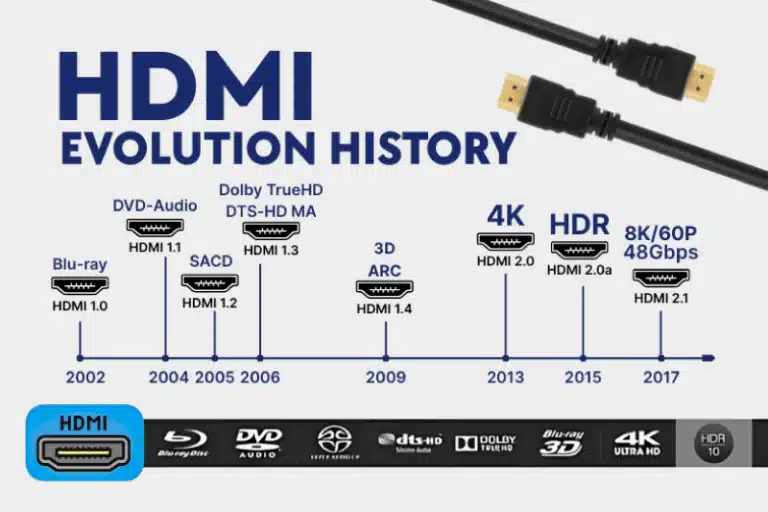
The HDMI 2.2 specification, released in 2025, further increases the bandwidth to an astonishing 96Gbps, supporting display effects up to 12K@120Hz and 16K@60Hz, laying the foundation for audio and video development for many years to come.
These improvements in technical parameters are not just theoretical; they directly relate to the user’s real experience. For example, the VRR (Variable Refresh Rate) and ALLM (Automatic Low Latency Mode) technologies introduced in HDMI 2.1 significantly improve the gaming experience, reducing screen tearing and input lag.
05: Practical Application Scenarios
In daily life and work, the HDMI interface plays an important role. Laptops can easily connect to external monitors or projectors via the HDMI interface for presentations and multimedia playback.
Gamers can connect their game consoles to 4K HDR-enabled TVs via HDMI for an immersive gaming experience; home theater enthusiasts can connect Blu-ray players, audio systems, and TVs via HDMI cables to build a high-quality audio-visual system.
It is worth mentioning the HDMI CEC (Consumer Electronics Control) function, which allows users to control all connected devices with a single remote control. Although different manufacturers have different names for this function (such as Sony’s BRAVIA Sync, Panasonic’s VIERA Link, etc.), the core functionality is similar.
The eARC (Enhanced Audio Return Channel) function further simplifies the connection of home theater systems, allowing the TV to directly transmit high-quality audio signals back to the sound system via an HDMI cable, eliminating the need for an additional digital optical cable.
06: Correct Selection and Use of HDMI Cables
With the wide variety of HDMI cables on the market, choosing the right one can be confusing for many consumers. In fact, HDMI cables are mainly divided into different types such as standard speed, high speed, and ultra-high speed, each supporting different bandwidth and data transmission requirements.
For most 1080p Full HD applications, a standard speed cable is sufficient; 4K HDR content requires a high-speed cable; and 8K or even higher-resolution video transmission requires an ultra-high-speed HDMI cable.
It’s worth noting that the length of the HDMI cable also affects signal quality. It is generally recommended that standard HDMI cables be no longer than 15 meters, and high-speed HDMI cables no longer than 10 meters. Exceeding these distances may require the use of a signal amplifier or fiber optic HDMI cable.
When purchasing HDMI cables, consumers should look for the official certification label on the packaging to ensure that the product quality and performance meet the requirements. Ultra96 HDMI cables supporting 96Gbps bandwidth are also expected to be launched in the fourth quarter of 2025, providing support for next-generation audio and video equipment.
07: Comparison of HDMI with Other Interfaces
Compared with traditional interfaces such as VGA and DVI, HDMI has significant advantages. VGA is an analog interface, susceptible to signal interference, and does not support audio transmission; while DVI is a digital interface, it is larger in size and also does not support audio.
The DisplayPort interface is HDMI’s main competitor, holding a certain advantage in the field of computer monitors, supporting higher refresh rates and resolutions. However, in the consumer electronics field, especially in TVs and home theater systems, HDMI remains the market mainstream due to its wide compatibility.
It is worth mentioning that the increasing popularity of the USB Type-C interface in recent years has provided a new option for video transmission. Through HDMI Alt Mode, users can connect display devices using a USB-C to HDMI adapter or cable, which is particularly useful on ultrabooks and tablets.
08: Future Development Trends
With the continuous advancement of display technology, the demand for interface bandwidth continues to grow. The capabilities of the HDMI 2.2 specification already far exceed the needs of current mainstream display devices, leaving room for development for many years to come.
The demands of gaming and virtual reality applications for high refresh rates and low latency, as well as the pursuit of higher dynamic range (HDR) and color depth in video content, will all drive the continued advancement of HDMI technology.
At the same time, wireless transmission technology may pose a challenge to wired interfaces. However, considering factors such as stability, security, and compatibility, HDMI’s dominant position in the wired connection field will remain for a long time.
Future HDMI technology will continue to develop towards higher bandwidth, stronger compatibility, and greater intelligence. There are already reports that Ultra96 HDMI cables supporting 96Gbps bandwidth will be available by the end of 2025, laying the foundation for 12K and even 16K ultra-high-definition displays. In the foreseeable future, HDMI will continue to play an irreplaceable role in home theaters, virtual reality, and professional design fields.
The next time we effortlessly connect our laptops to a large-screen TV and enjoy the pleasure of high-definition audio and video, we might remember the rich technological accumulation and the spirit of humanity’s relentless pursuit of audiovisual experience embodied in this small interface.


