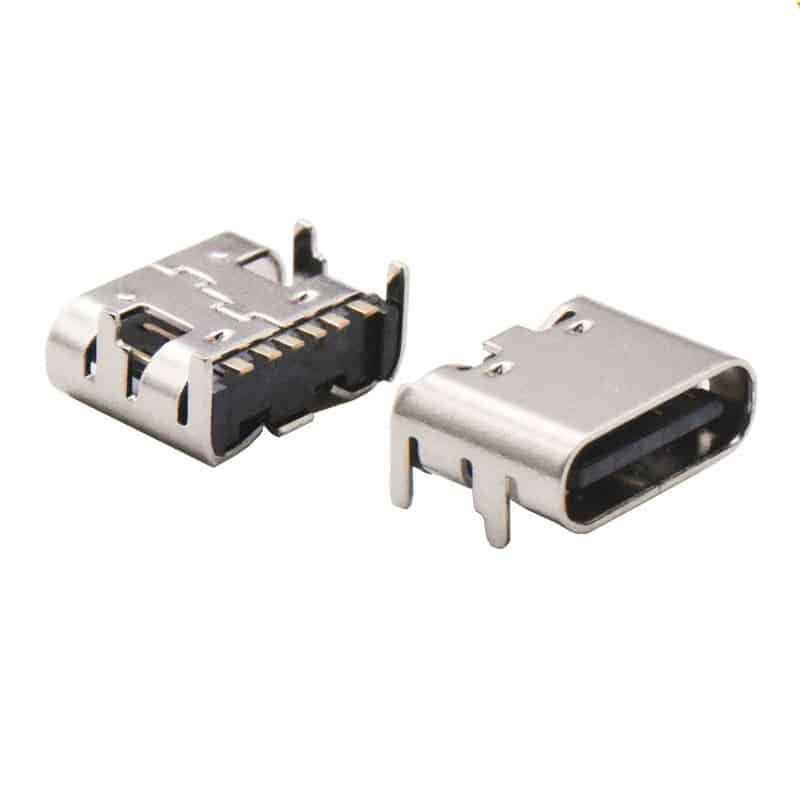
USB4.0 connector

USB C Receptacle

A USB C receptacle (or port) is a type of connector used for USB connections, also known as USB type C female connector or USB C female connector. The USB-C female connector is a universal interface widely used in modern electronic devices. Below is a detailed introduction to its core features, pin definitions, technical parameters, and selection considerations.

Features:

USB Type C Connector Alternatives: TE, MOLEX, Amphenol, Foxconn, JAE, HRS, SMK, ACES.

A USB-C receptacle is an electronic component that allows for connecting a USB-C cable to a device. It is a type of USB interface that uses a reversible connector with a single port for data and power.

  • Reversible connection: The USB-C connector can be inserted into the receptacle in either orientation.
  • Data and power transfer: Supports both data synchronization and power delivery.
  • High-speed data transfer: Supports data transfer speeds up to 10 Gbps.
  • Power delivery: Can deliver up to 100W of power, enabling fast charging of devices.

Applications of USB Type C Female Connector:

USB C receptacle is widely used in various devices, including:

  • Laptops: For charging and data transfer.
  • Smartphones: For charging and data transfer.
  • Tablets: For charging and data transfer.
  • Cameras: For charging and data transfer.
  • Printers: For data transfer.

Detailed Pin Definitions:

A full-featured USB-C female connector has 24 pins, designed symmetrically. These pins can be mainly divided into the following groups according to their functions:

* Power pins: Includes 4 VBUS (bus power) and 4 GND (ground) pins, ensuring stability during high-current transmission.

* High-speed differential signal pairs: Used to support high-speed data transmission protocols such as USB 3.0/3.1.

* USB 2.0 differential signal pairs: Used for compatibility with the USB 2.0 protocol.

* Configuration channels: The CC1 and CC2 pins are the “intelligent core” of the connector, responsible for connection detection, plug orientation recognition, current mode negotiation, and USB Power Delivery (PD) fast charging protocol communication.

* Sideband usage pins: SBU1 and SBU2 are mainly used to transmit audio signals in alternating mode.

Key Technical Parameters:

When selecting industrial USB-C connectors, the following technical parameters should be considered:

* Current rating: Power pins can support 5A, while other signal pins are typically 1.25A.

* Insulation resistance: Minimum 100MΩ (under DC 500V conditions). * Voltage withstand capability: Withstands 100V AC RMS.

* Operating temperature range: Typically -40°C to +85°C, some models support -55°C to +85°C.

* Mechanical life: High-quality connectors have a mating life of up to 10,000 cycles.

Selection Guide: Choose by Pin Count

Choosing the appropriate pin count version based on your needs can optimize cost and design:

Applicable Scenarios

 Main Function

Applicable Scenarios

24-Pin (Full-Functional)  

Supports all functions including USB 3.0/3.1 high-speed data, PD fast charging, and video output. 

High-end laptops, docking stations, devices requiring high-speed data transfer and video output.

16-Pin (USB 2.0)

Retains the CC pin required for USB 2.0 data cable and PD fast charging, removes high-speed differential signal pins.

Microcontroller development boards, small appliances, keyboards, mice, and other peripherals with low data transfer speed requirements.

6-Pin (Charging Only)

Retains only VBUS, GND, and CC pins, focusing on power transfer.

Power tools, smart home devices, and other devices that only require charging and not data communication.


When you select, you also need to confirm the required mounting method (e.g., surface mount or through-hole) and whether waterproofing is needed.

Know More

usb-c 24 pin vs usb-c 16pin

USB-C 24-Pin Full-Featured vs. 16-Pin USB 2.0: Key PCB Layout Considerations

Understanding the differences in PCB layout between the USB-C 24-pin full-featured and 16-pin USB 2.0 connectors is crucial for ensuring stable device performance. The main distinction lies in the support for high-speed signal lanes, which directly impacts the complexity of layout and routing. The following table compares their key design points. Design Consideration USB-C 24-Pin (Full-Featured) USB-C 16-Pin (USB 2.0
Read More »
usb type c pcb connector

Special Protective Standards Required for usb type c pcb connector in Industrial Automation Equipment

In industrial automation equipment, the protective standards that USB type C PCB connector must meet are significantly more stringent than those in the consumer electronics sector, primarily to address the challenges of harsh environments. The table below summarizes these critical protective standards and requirements for a quick overview. Protection Category Core Standard / Rating Significance and Requirements in Industrial Environments

Read More »
what's USB Type C Pinout definition(24P 16P/12P 6P) ?

What’s USB Type C Pinout definition(24P 16P/12P 6P) ?

USB Type C Pinout Guide and Features: USB-C, or USB Type-C connector, is a 24-pin connector (not a protocol) that replaces previous USB connectors and can carry audio, video, and other data. 24 Pin USB Type C Pinout The 24 pin Type C Connectors has the most comprehensive functions, including the functional pin that supports PD fast charging, USB 3.0/USB

Read More »
Request A Quote